FXS and FXO are the two kinds of analog port you meet when connecting old telephone equipment to a new IP phone system. They look the same, both take an ordinary RJ11 telephone cable, but they do opposite jobs. Plug a phone into the wrong one and you get silence. This guide explains FXS vs FXO in plain words, shows what to connect to each, and helps you decide which gateway ports your site needs.
FXS vs FXO in one line
FXS gives a phone a dial tone. FXO takes a dial tone from a line.
- FXS (Foreign Exchange Station) behaves like the telephone exchange. It supplies power, dial tone and ringing voltage. You connect analog phones, fax machines and door phones to it.
- FXO (Foreign Exchange Office) behaves like a telephone. It expects power and dial tone from someone else. You connect an analog telephone line from an operator, or an extension port of an old EPABX, to it.
A simple test: if the device on the other end of the cable is something a person picks up and talks into, it needs an FXS port. If the cable comes from the wall socket of a telephone line, it goes into an FXO port.
Side-by-side comparison
| Point | FXS port | FXO port |
|---|---|---|
| Acts like | The exchange | A telephone |
| Supplies dial tone and ring | Yes | No, it receives them |
| Connect to it | Analog phones, cordless base stations, fax machines, door phones, lift phones | Analog lines from a telephone operator, extension ports of an old PBX |
| Typical use | Keep existing handsets as extensions on an IP PBX | Bring existing landlines into an IP PBX |
| Direction of calls | Internal users make and take calls through the PBX | Outside calls come in and go out through the line |
| Common mistake | Connecting an operator line to it, which can damage the port | Connecting a phone to it, which gives no dial tone |
Where FXS ports are used
Most Indian sites that move to an IP PBX still have analog handsets that work fine. Replacing every one at once is costly, and in some places an analog phone is simply the better choice.
- Hospitals: ward phones, nurse stations and lab extensions on old cabling.
- Hotels: room phones, where long cable runs already exist to every room.
- Factories and warehouses: robust shop-floor phones that survive dust and rough handling.
- Campuses and hostels: many low-use extensions spread across buildings.
- Fax machines and door phones: devices that only have an analog connection.
An FXS gateway sits near the existing cable termination. Each port becomes an extension on the IP PBX, so an analog phone can use transfer, voicemail and short codes like any IP phone. Read connect analog phones to an IP PBX for the full migration steps.
Where FXO ports are used
FXO ports matter less than they used to, because most businesses now take outside lines as SIP trunks or PRI. They still help in a few cases:
- A branch office has only one or two analog landlines and no SIP trunk is available yet.
- You need a backup line that works when the internet link is down.
- You want to connect an old EPABX to a new IP PBX during a phased migration, so both systems can call each other.
If your outside lines are digital, read what is a PRI line and SIP trunk in India instead.
How many ports do you need?
Count devices, not people.
- FXS: one port for every analog phone, fax or door phone you will keep. Add a few spare ports for growth and for faulty cables you find during installation.
- FXO: one port for every analog line you will bring in. Most offices need very few, or none.
- Group ports by location. A building with 40 analog phones on one cable frame is better served by one large gateway there than by many small ones across the site.
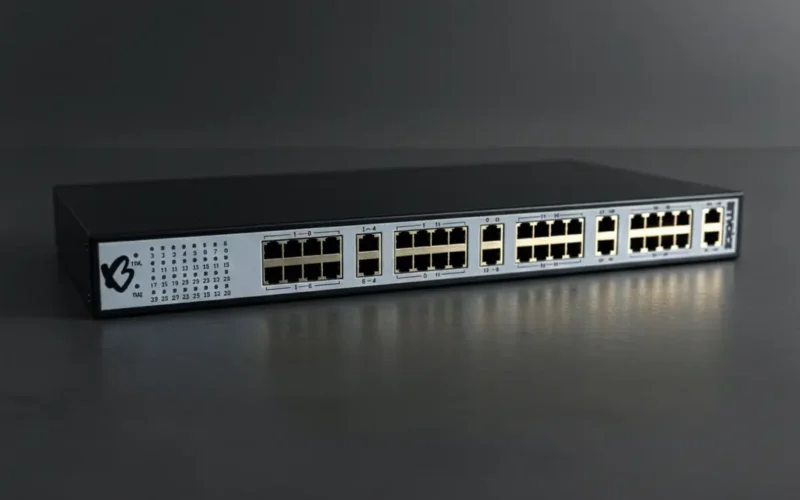
Gateways come in fixed sizes, so round up. The BitVoice analog VoIP gateways come in 8, 16, 24 and 32 port models, all TEC certified under MTCTE, which matters for government and PSU tenders.
Setting up FXS ports with Voxdial IP PBX
Voxdial IP PBX manages analog gateways from its Auto Provision section. The operator:
- Adds the gateway with its name, MAC address and model. The model sets the number of ports.
- Maps each port to an extension.
- Generates the configuration and lets the gateway pick it up.
The gateway list shows how many ports are in use out of the total, and the operator can restart a gateway from the same screen. BitVoice gateways are auto-provisioned this way, so a technician does not have to configure each port by hand on the gateway itself.
For outside lines, Voxdial works with SIP trunks, PRI E1 cards and analog FXO and FXS gateways, so a site can mix old and new lines while it migrates.
Tips before you buy
- Walk the site and label every analog device before you count ports.
- Check cable runs and the condition of old copper. Long or damaged runs cause hum and ring problems that look like gateway faults.
- Keep fax machines on G.711 or T.38 rather than a compressed codec. See fax over IP with T.38.
- Put the gateway on a UPS with the network switch, so analog phones keep working during short power cuts.
Not sure whether you need FXS, FXO or both? Talk to BitVoice and we will help you count ports for your site.
FAQs
What is the difference between FXS and FXO?
An FXS port supplies dial tone and ringing to an analog phone. An FXO port receives dial tone from an analog telephone line. Phones go into FXS ports; operator lines go into FXO ports.
Can I connect an analog phone to an FXO port?
No. An FXO port does not supply power or dial tone, so the phone will stay silent. Analog phones, fax machines and door phones need FXS ports.
Do I need FXO ports if I have a SIP trunk?
Usually not. A SIP trunk connects straight to the IP PBX over the network. FXO ports are only needed for analog landlines, a backup line or linking an old EPABX.
How many FXS ports do I need?
One for each analog phone, fax machine or door phone you keep, plus a few spare. Gateways come in fixed sizes such as 8, 16, 24 or 32 ports, so round up.